Make more profit with AI. Every Sunday I share one AI setup I use in my own business, and what it saved me. Free.
Share
I now do most of my work from my phone (laptop at home)
Published 4 days ago • 8 min read
ISSUE 5 · SUNDAY 1 NOVEMBER
I now do most of my work from my phone
3 ways to do it, for Claude and ChatGPT users
Mike McDonnell
The Growth Toolkit newsletter
Hey Reader,
Last week we got AI writing just like you, without it sounding like AI. This week, let's get it doing long-running tasks for you while you're nowhere near your desk! 📱😍
Of everything I've set up with AI, this has by far given me the most freedom in life. "Traditional" office work sitting at your desk can thankfully now be a thing of the past. A large portion of my work is now triggered from my phone: out on a walk or a run, at the gym, in a café, on the sofa, even when I'm away. My phone now triggers long-running tasks that control my entire computer, and it delivers them outstandingly well.
I basically built an entire iOS app, called Gnomie, which is now on the App Store, whilst out in the garden gardening, on my phone! I'd fire off a prompt, the AI would work for 30 to 60 minutes and check back in with me, then I'd review the work and fire off more improvements.
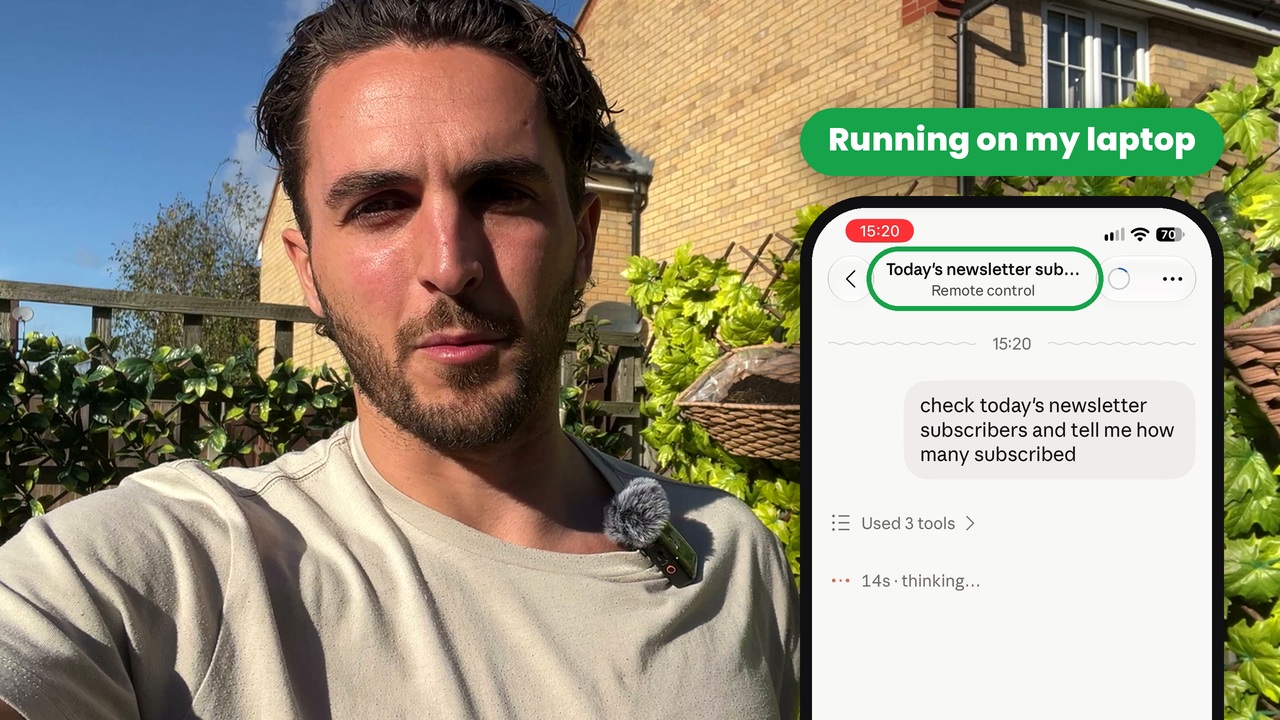
Here's one from this week... I'd emailed a few of you (clients, friends and family) asking if you'd like to join this newsletter, and the replies came in while I was out. So from my iPhone I sent Claude a message: "more have replied, please check and add them to my Kit email subscribers list". It found the replies in my inbox and added everyone who'd said yes to my email list, while my laptop was sat at home!
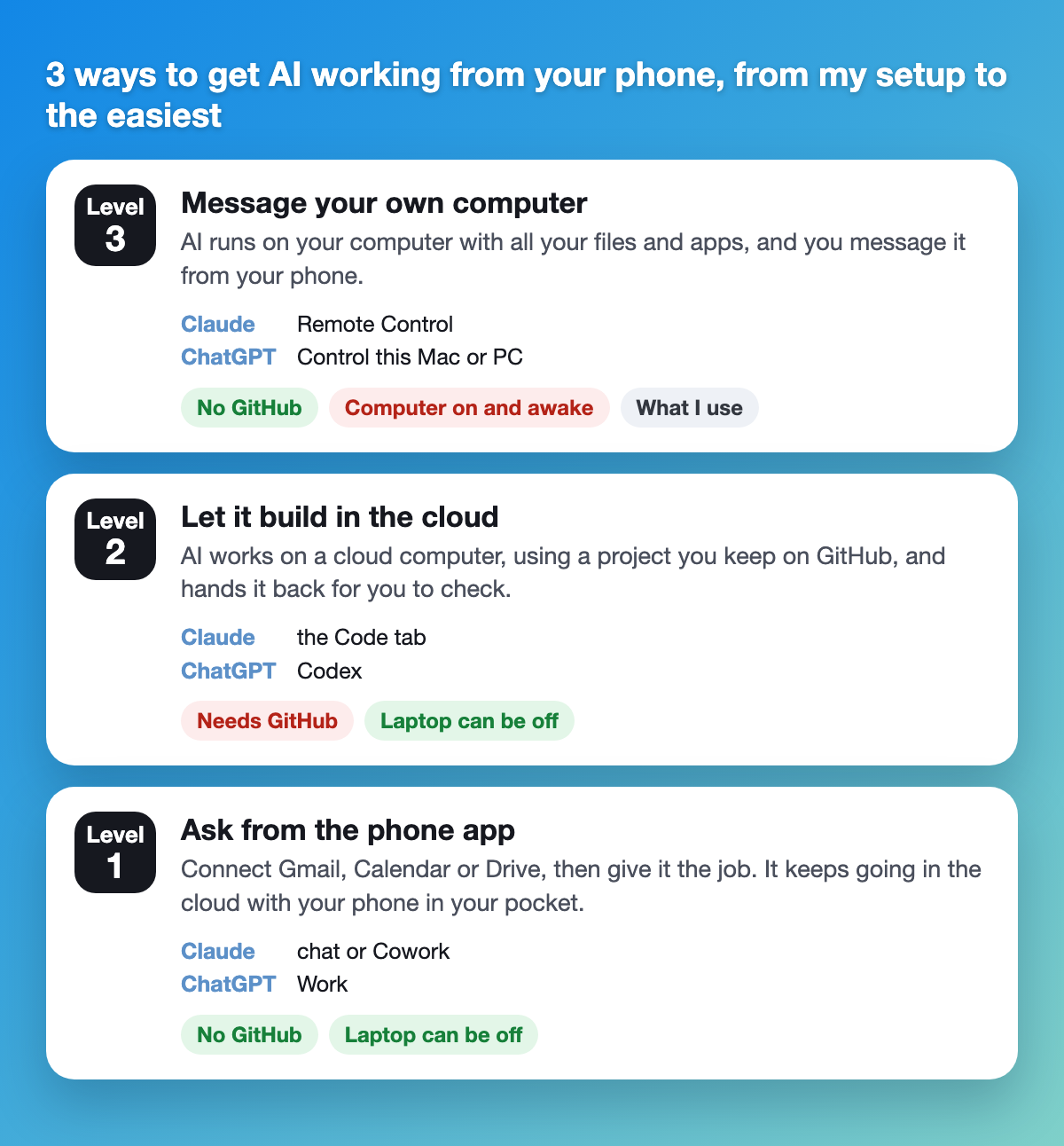
You can do this in Claude or in ChatGPT, and there are 3 ways to do it. I'm starting with the most powerful one, the setup I use, then working back to the easiest. Pick the one that suits you.
Level 3: message your own computer from your phone (what I use)
This is my setup, and it's how those newsletter replies got added. Claude runs on my Mac at home, with all my files, folders and apps, and I message it from my iPhone like I'd message a person. No GitHub needed, unless you want it of course.
In Claude (Claude Code in the desktop app, from issue 1)
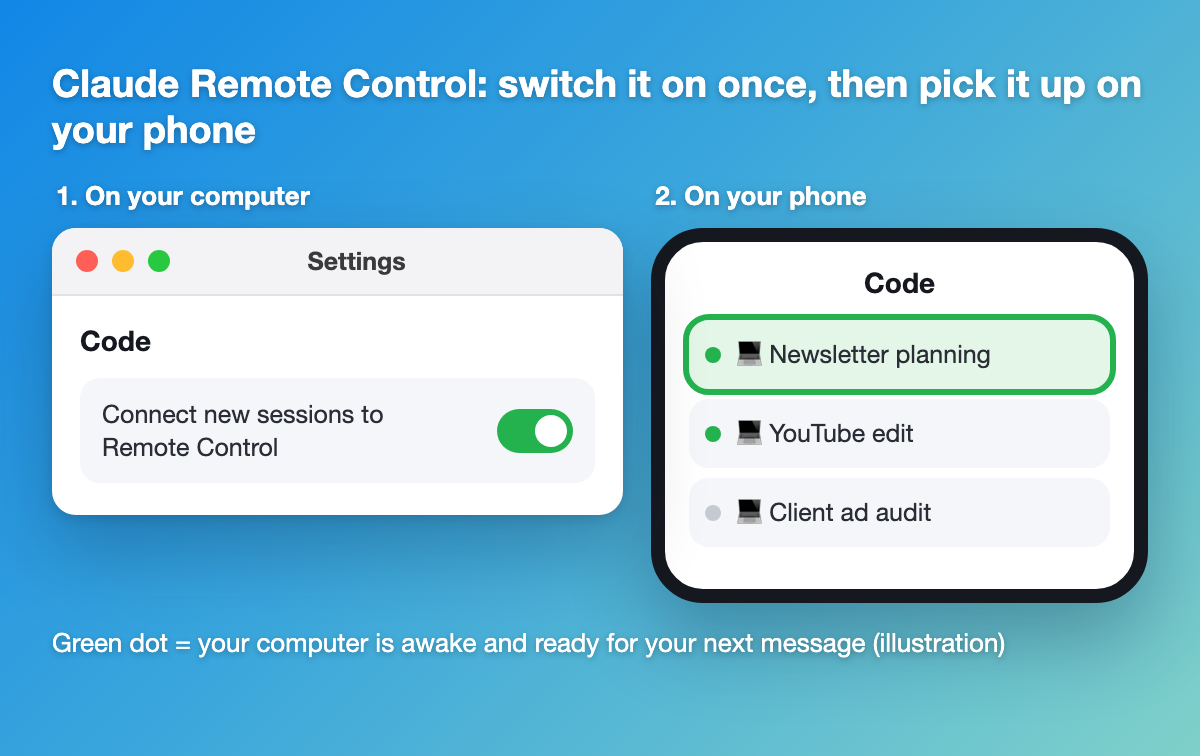
On your computer, go to Settings, then Code, and turn on "Connect new sessions to Remote Control".
Start a session in the Code tab, in the folder you want it working in.
On your phone, open the Claude app, tap Code, and tap the session with the green dot.
Then simply message it! This isn't just a phone thing either. I have a few Macs, so I'll start a session on my MacBook Pro, leave it on, and when I want to pick it up a few days later, I open Claude Code on my MacBook Air on the sofa downstairs and carry on where we left off.
It works for whatever you want, too! Claude edits my videos and audits the ad campaigns we're running for clients. It suggests improvements, and once I've approved them, it puts them in place as well. It builds us websites and software, and it even finds the best value hotels when we travel for work, then books them! The possibilities are endless..
In ChatGPT (Codex in the desktop app)
Turn on multi-factor authentication (MFA) first. That's the extra code you type in when you sign in, and ChatGPT won't connect your phone without it. I had to switch mine on to do this! You'll find it in Settings, under Security.
On your computer, go to Settings, then Connections, then Control this Mac or PC, and follow the steps.
Scan the QR code with your phone.
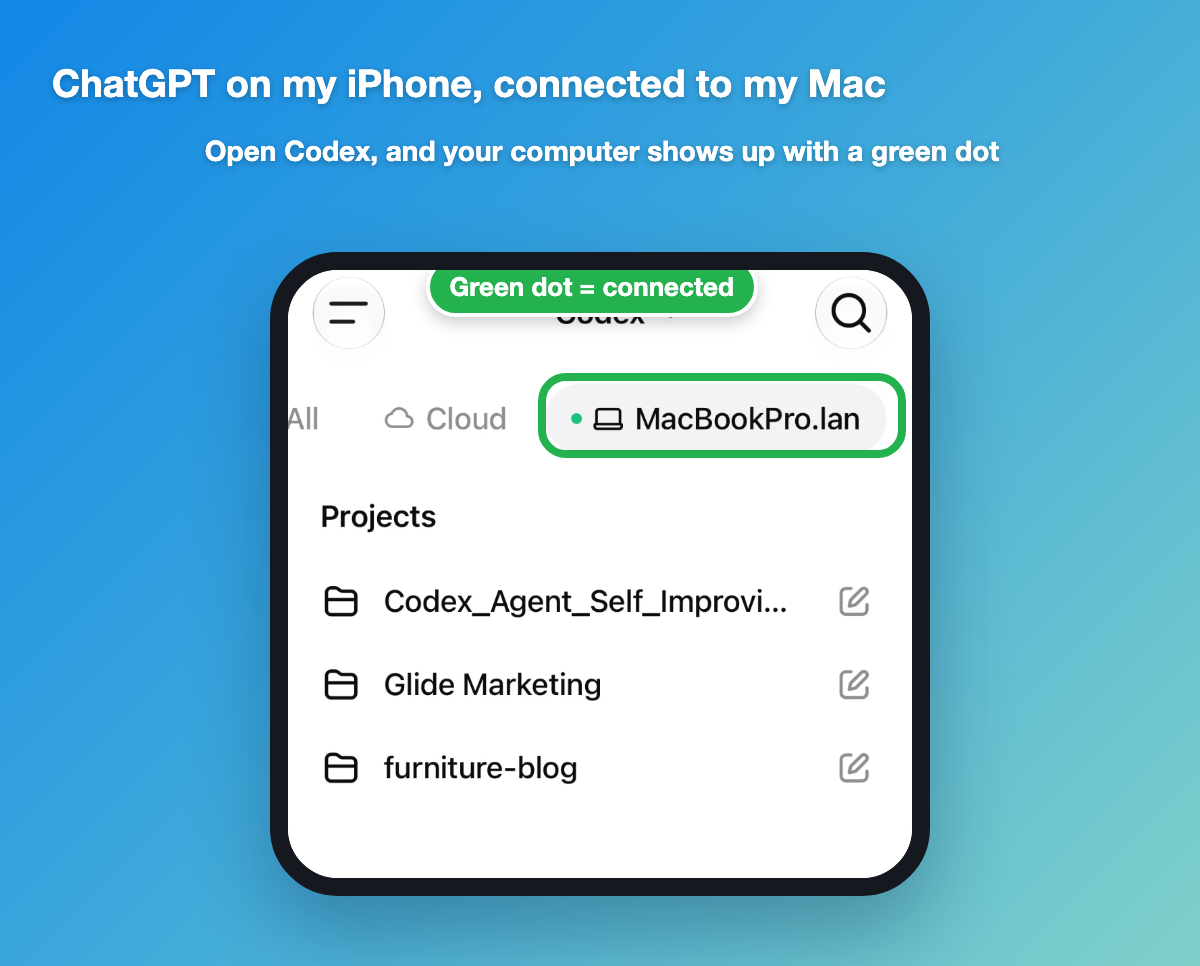
On your phone, open the ChatGPT app and tap Codex. Your computer shows up at the top with a green dot when it's connected.
I tried this for the first time this week. From my phone, not even in a project, I asked it:
On my MacBook Pro, I have an AI Sandbox folder, and in there is The Growth Toolkit. Can you go in there and, based on the newsletter, stats, YouTube stats and engagement so far, and what we're planning, tell me what you think my next YouTube video should be about and why. I'm happy to go with what you think, and let me know if you have any questions before you start.
It started looking in the folder I'd asked it to, and next minute my MacBook started playing a YouTube video. I thought, what's that sound?? It was a TUI advert lol
It had gone onto my channel to look at the stats, then read my planning files. And funnily enough, it said my next video should be about using Claude from your phone to get work done while you're away from your desk, and told me why. I'm very impressed with the first test! I used GPT Sol by the way on medium effort.
And this one blew my mind: ChatGPT Work can use your computer too
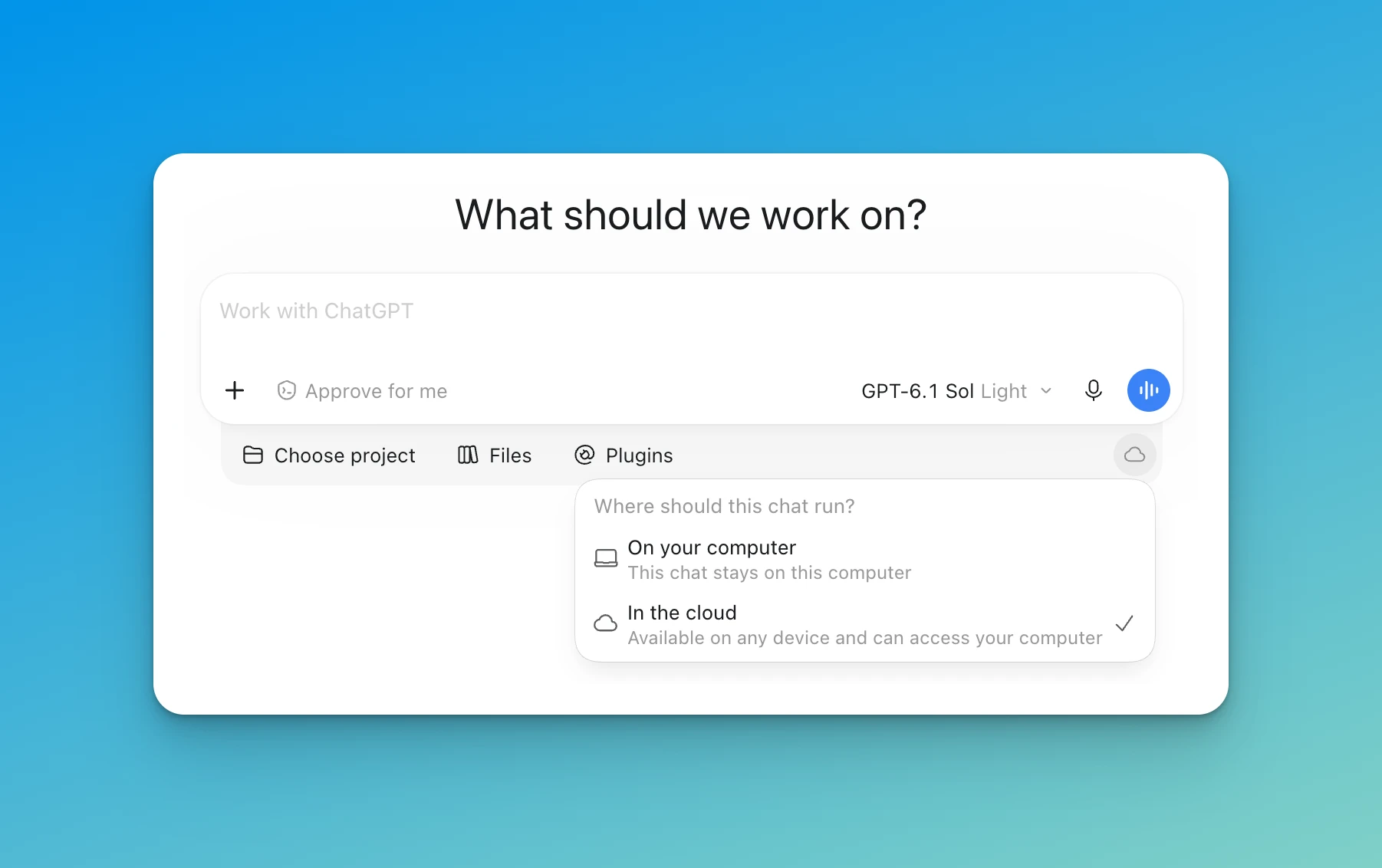
You don't even need Codex for this. In ChatGPT Work on your computer, there's a little cloud button under the message box. Click it and it asks "Where should this chat run?". Pick In the cloud, which says it's "available on any device and can access your computer".
I gave it access to my AI Sandbox folder and asked it to find my design systems for Glide Marketing and The Growth Toolkit and add them in for it to use now and in future. It went off, found my brand guidelines and saved them into the chat as a file it can refer back to. I've only tried it once, but it worked!
The catch with all of Level 3: your computer has to be on and awake. If the Mac goes to sleep, the session pauses until it wakes up again. Closing a MacBook lid sends it to sleep too, so if you're going out, leave the lid open and plugged in! ChatGPT is the same, OpenAI says your computer needs to stay awake and online. The one way round it on a MacBook is to keep it plugged in to power and an external monitor, as it then stays awake with the lid shut.
Level 2: let AI build things in the cloud (needs GitHub)
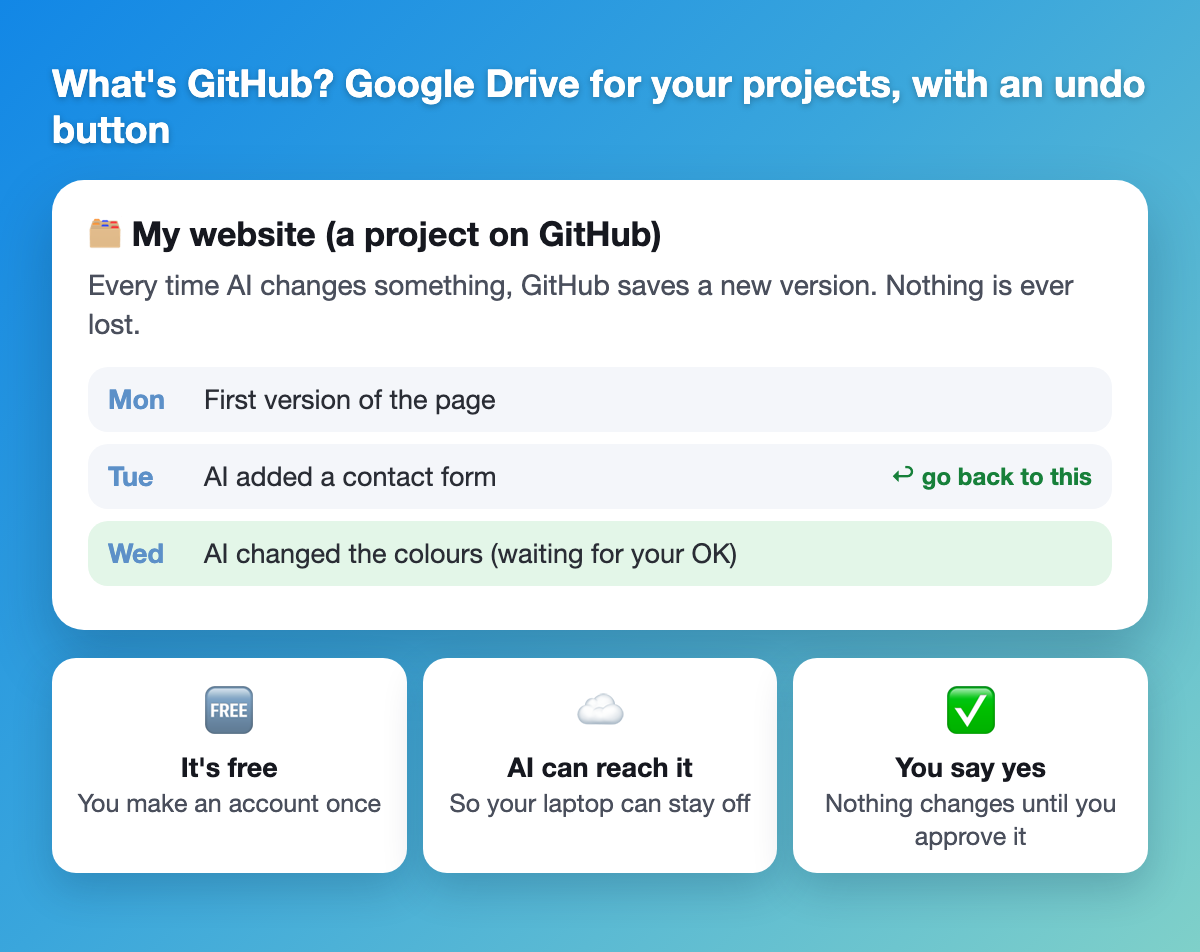
If you want AI to build or change something, like a web page, a spreadsheet tool or a little app, it needs somewhere to keep the files. Your laptop's at home, so it uses GitHub instead.
What's GitHub? Think of it as Google Drive for your projects, with an undo button. It's free, and every time AI changes something it saves a new version, so you can always go back. AI works on a computer in the cloud, opens your project from GitHub, does the job, then hands it back for you to check.
Create a "repository" (that's just GitHub's word for a project folder), and tick the box to add a README file.
Connect GitHub to Claude at claude.ai/code, or in ChatGPT start a Codex task, choose Cloud, then Create environment, pick your repository and press Publish.
After that, it's all from your phone:
In Claude: open the app, tap Code, pick your project, type the job and put your phone away.
In ChatGPT: open the app, tap Codex, pick your project and type the job.
This one's on the paid plans too (Claude Pro or ChatGPT Plus and up). Either way, AI saves its work as a separate copy, so nothing changes in your project until you've looked at it and said yes. I use GitHub for everything I build, and it's how all my Macs stay in sync!
Level 1: give it a job from the phone app (no setup)
This is the easiest by a mile, and your computer can be switched off! It all runs in the cloud (a computer somewhere else that the AI company runs).
First, connect the apps you want AI to use, like Gmail, Trello, Asana, Notion, Google Calendar or Google Drive. It's easiest to do this bit on your computer, then they show up on your phone too, although in ChatGPT you can add them in the phone app as well.
In Claude: Settings, then Connectors.
In ChatGPT: Customise, then Plugins (that's ChatGPT's word for connectors).
Then, from your phone, give it a job like this:
Check my emails from today and tell me if anything needs a reply before tomorrow. Draft the replies for me to check and put them in my Drafts folder, but don't send anything as I need to review them first.
For a bigger job, you can use the mode that keeps working in the cloud while your phone's in your pocket:
In Claude, it's Cowork. Look for it by the message box (in the newest version of the app you just ask, there's no separate button). It'll send you a notification when it's done, or if it needs you.
In ChatGPT, it's Work. Open the app and select Work, then describe the job. It's what I use ChatGPT for when I'm out, mostly for jobs in my inbox.
For the technical people.. these both have a context window of around 500k tokens, depending on which model you're using. Claude Code and Codex have double that for models like Opus, Fable, Sol and Astra, so a 1m context window (that's how much your agent can hold in its head at once).
One safety thing: these apps can send emails and delete calendar events, so keep the "ask me first" settings on!!! Claude asks before it sends or deletes anything unless you change it, and ChatGPT lets you allow it to read your email without allowing it to send.
Cowork and Work are on the paid plans (Claude Pro or ChatGPT Plus and up).
Your job this week
Pick the level that suits you.
Level 3: turn on Remote Control in Claude (or switch on MFA, then Control this Mac or PC in ChatGPT), leave it running and send it a job from your phone the next time you're out.
Level 2: make a free GitHub account and a repository, connect it, and from your phone ask AI to build you a simple one-page website about your favourite hobby.
Level 1: connect Gmail or your calendar to Claude or ChatGPT, then from your phone ask it what needs your attention tomorrow.
Prefer to watch it?
I filmed the whole thing in my garden! All 3 levels, with the screens up so you can follow along step by step 🎥
THE GROWTH TOOLKIT Hey Reader, Last week we taught AI who you are. Now let's get it writing like you! You can spot AI writing a mile off!!! There'll be an em dash in almost every paragraph, or sentences like "it's not just a tool, it's a game-changer", or it'll talk about your industry being an "ever-evolving landscape" 😬 🤢If you're like me, the second you see it, you switch off and go elsewhere! On this subject, LinkedIn recently added a button, labelled "Seems like AI slop". Posts where...
THE GROWTH TOOLKIT Hey Reader, How many times have you typed "keep it short" or "I'm in the UK" into ChatGPT? Every new chat starts from scratch. It doesn't know what you do for work, who's in your family or that you can't stand a wall of bullet points, so you end up explaining yourself again.. and again. This week we fix that. It's all in the settings, there's nothing to install and it works on your phone too. When I started out I did this in ChatGPT, with a few lines about me in the custom...
THE GROWTH TOOLKIT Hey Reader, Last week we got you set up, ready to get the most out of AI. A few of you replied, including my dad, asking for a bit more clarity on step 3: you couldn't find anywhere to pick a folder. Each of those replies came from ChatGPT/Codex users. That one's on me, so apologies. I skipped over ChatGPT and didn't give you the link to download the desktop app. Here it is: chatgpt.com/download (Mac and Windows). Just like with Claude, you need the desktop app, the one you...