THE GROWTH TOOLKIT
Hey Reader,
How many times have you typed "keep it short" or "I'm in the UK" into ChatGPT?
Every new chat starts from scratch. It doesn't know what you do for work, who's in your family or that you can't stand a wall of bullet points, so you end up explaining yourself again.. and again.
This week we fix that. It's all in the settings, there's nothing to install and it works on your phone too.
When I started out I did this in ChatGPT, with a few lines about me in the custom instructions and memory switched on. Then I moved over to Claude and took my memory with me, and I'll show you how to do that as well.
Then next week, once AI knows who you are, I'll show you how to get it writing like you too.
Teach AI about you
There are two parts here and you want both! Instructions are a few lines you write about yourself, then every new chat will read them. Memory is what the AI automatically picks up from your chats as you use it.
Step 1: let AI write your instructions
The blank box you start with is the hardest bit, because you're not sure where to start... So just get AI to interview you! Open a brand new chat in ChatGPT or Claude and paste this prompt:
I want you to help me write my custom instructions, so you know who I am and how I'd like you to respond in every new chat.
Interview me one question at a time. Ask about my work, what I mostly use you (AI) for, where I'm based, anything about my family or hobbies that would help you provide a more accurate response, and how I'd like you to respond (short or detailed, bullet points or paragraphs, formal or chatty).
After you've asked me 8 to 10 questions, write it up in two short parts called "About me" and "How I like answers". Keep it under 1,500 characters and use English [UK/US - change based on what you'd prefer].
Answer as much or as little as you like, then copy what it writes back to you.
Mine in ChatGPT is mostly writing rules (no em dashes, no buzzwords), and mine in Claude says I run Glide, that I co-own a business with my dad, what my professional and personal goals are and what hobbies I'm into. Therefore, I never have to explain any of that in a chat! Hurrah :)
Step 2: paste them in
In ChatGPT
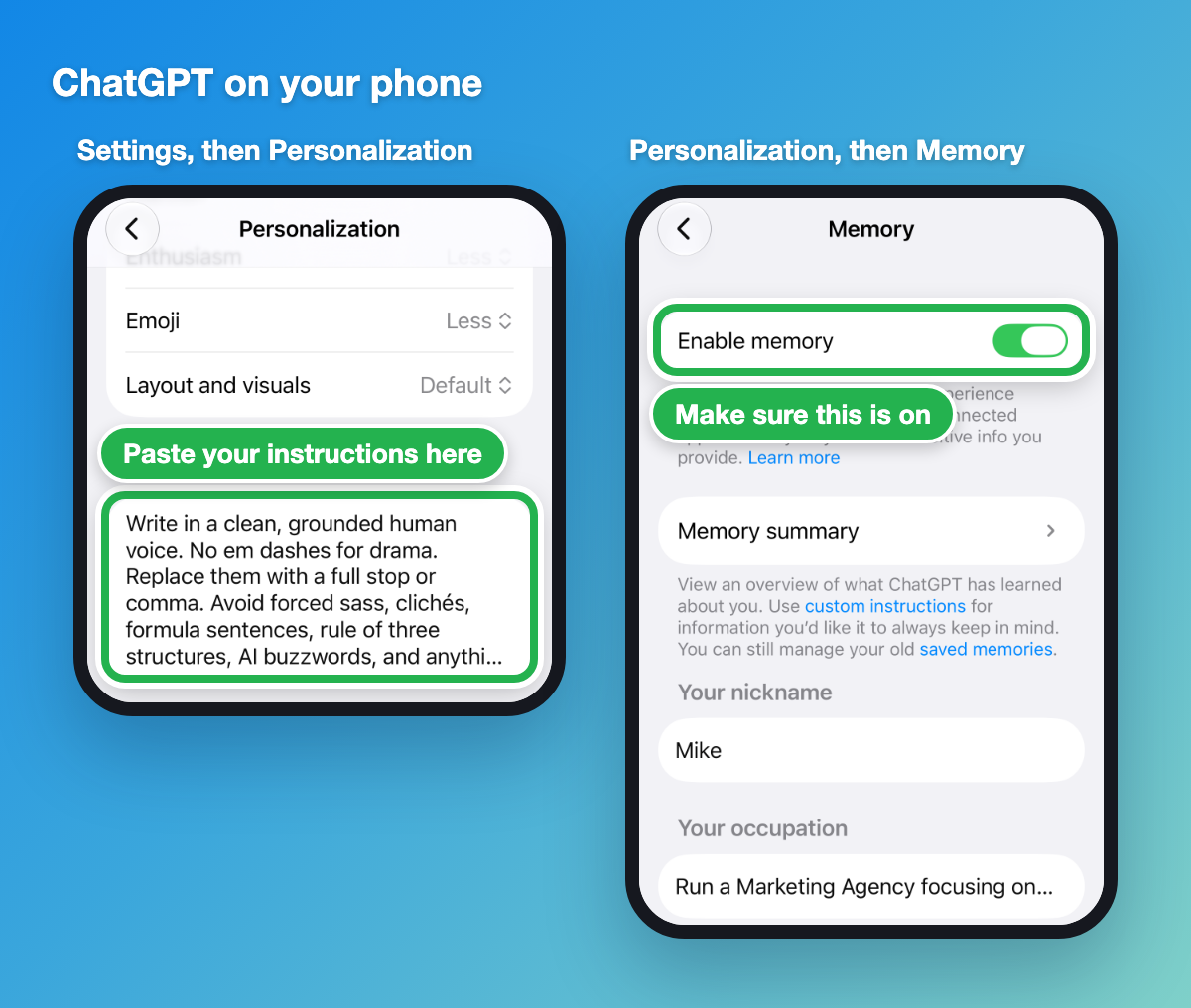
On your phone: tap your name, then Settings, then Personalisation, and paste it into the Custom instructions box.
On your computer, do it on chatgpt.com in your browser: click your name bottom left, then Settings, then Personalisation. It's the same box.
The free plan holds 1,500 characters and the paid plans 5,000. The prompt above keeps you under the free limit.
In Claude
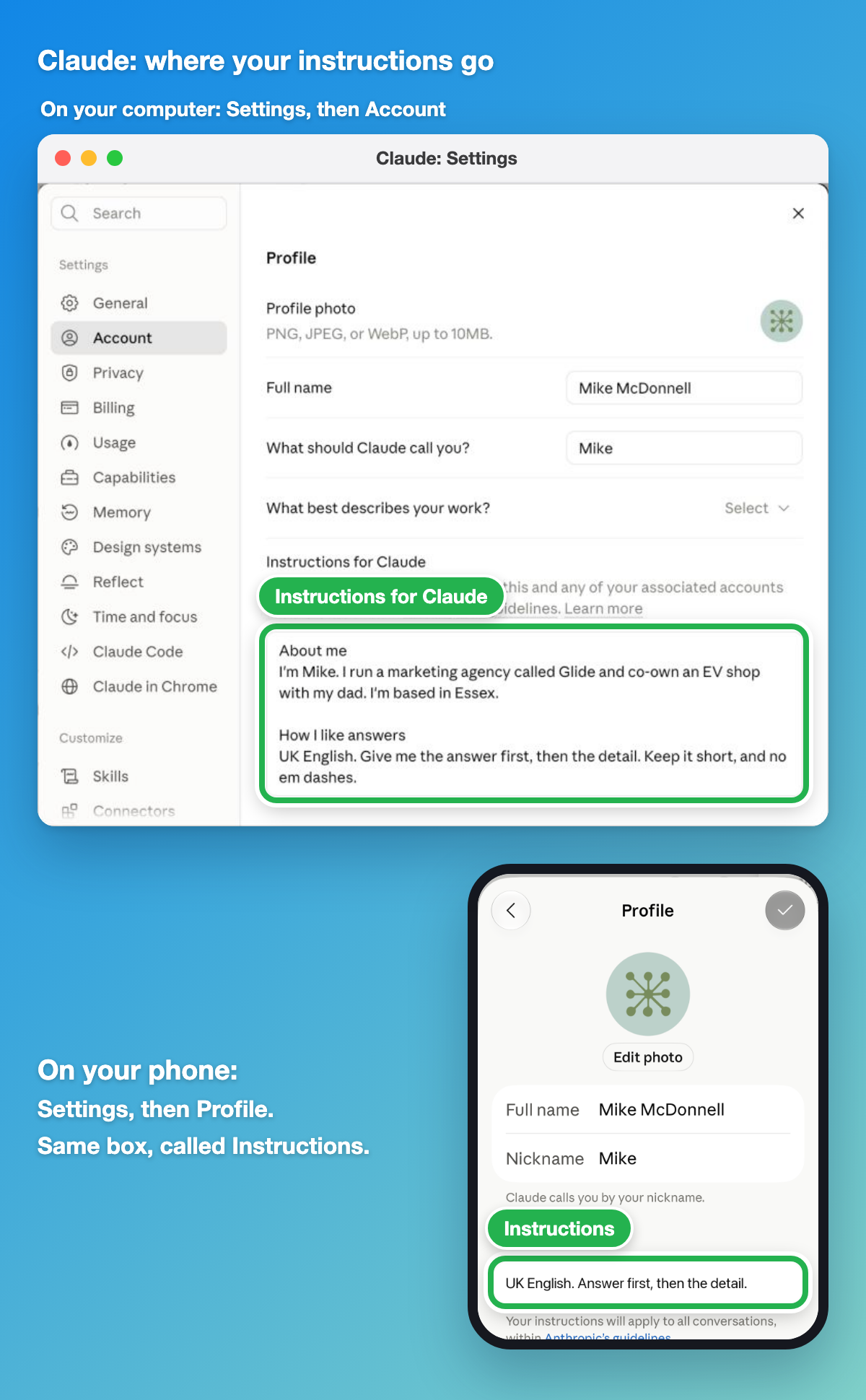
On your computer: click your name bottom left, then Settings, then Account, and paste it into Instructions for Claude.
On your phone: Settings, then Profile. It's the same box, called Instructions.
Step 3: check that your memory's switched on
Both now remember things from your chats on their own, free plans included. It's worth a quick look to check it's on and to see what they've picked up.
ChatGPT: Settings, then Personalisation, then Memory. Make sure Enable memory is on (it's the second phone in the picture above). Tap Memory summary to see what it's learned about you.
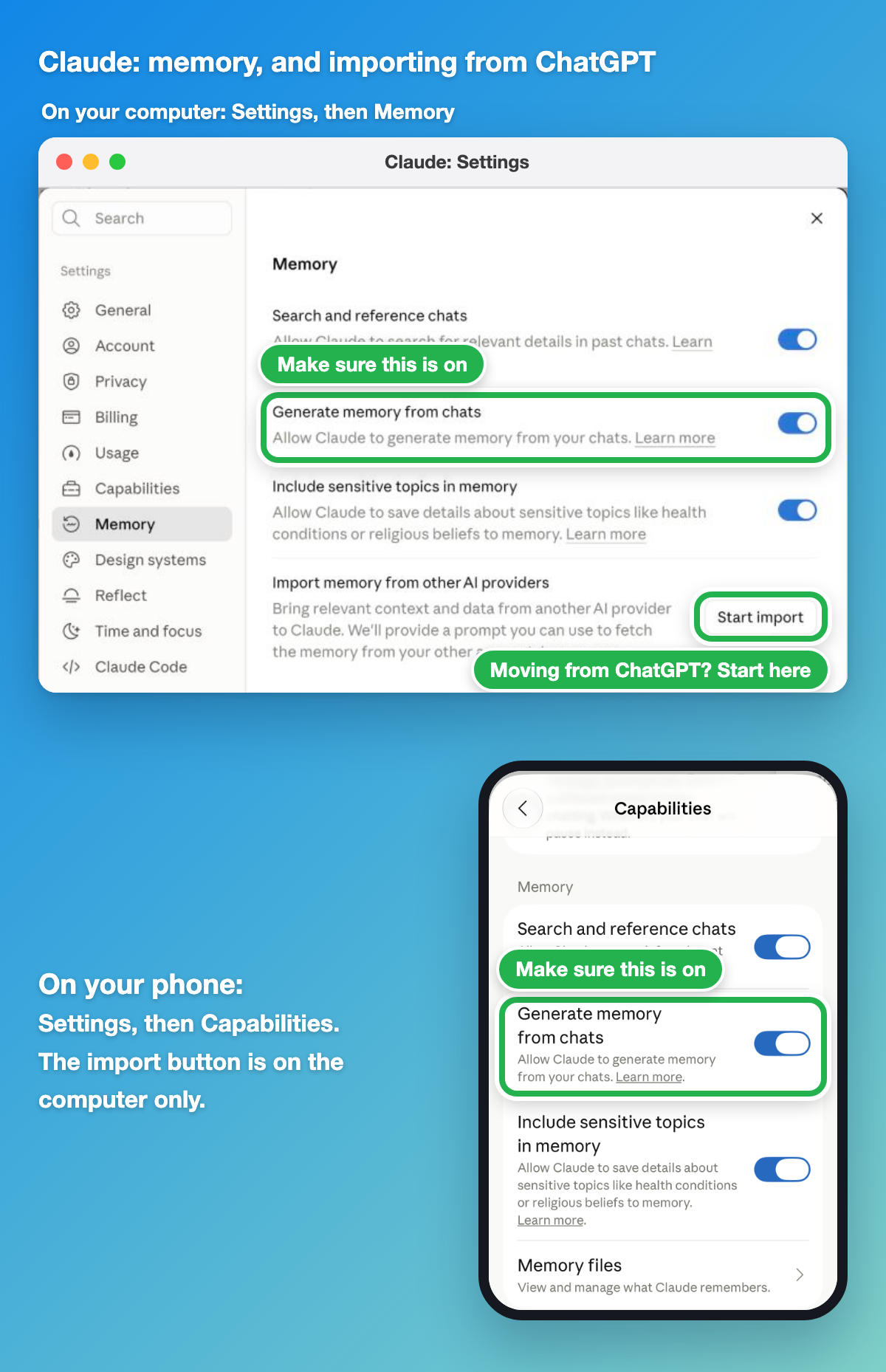
Claude: on your computer it's Settings, then Memory. On your phone it's Settings, then Capabilities. Either way, make sure "Generate memory from chats" is on. To see what it's saved, scroll down the Memory page on your computer, or tap Memory files on your phone.
The quickest way to test this is to start a new chat and ask "What do you remember about me?" If something's wrong or out of date, just tell it, e.g. "I've changed jobs, I'm now a project manager at...". You can also say "Remember that..." any time.
Got something you don't want remembered?
ChatGPT has Temporary chat and Claude has incognito (the ghost icon top right of a new chat). Neither saves anything to persistent memory.
What about if you're moving from ChatGPT to Claude or vice versa?
Of course, you want to bring the memory across! This is exactly what I did. Both Claude and ChatGPT have an import tool for this, and Claude's works on the free plan.
In Claude, it brings across what ChatGPT has learned about you, not your old chats.
- In Claude on your computer, go to Settings, then Memory, and click Start import (bottom right in the picture above).
- Copy the prompt Claude gives you and paste it into a new ChatGPT chat.
- Read through what ChatGPT gives back and delete anything that's out of date or that you'd rather not move.
- Paste it into Claude and click Add to memory.
It's on the computer only, the phone app doesn't have the button to do this. Claude's memory leans towards work related info, so it might not keep some of your personal information. Anything it drops, add to your instructions from step 2!
Going the other way, from Claude to ChatGPT?
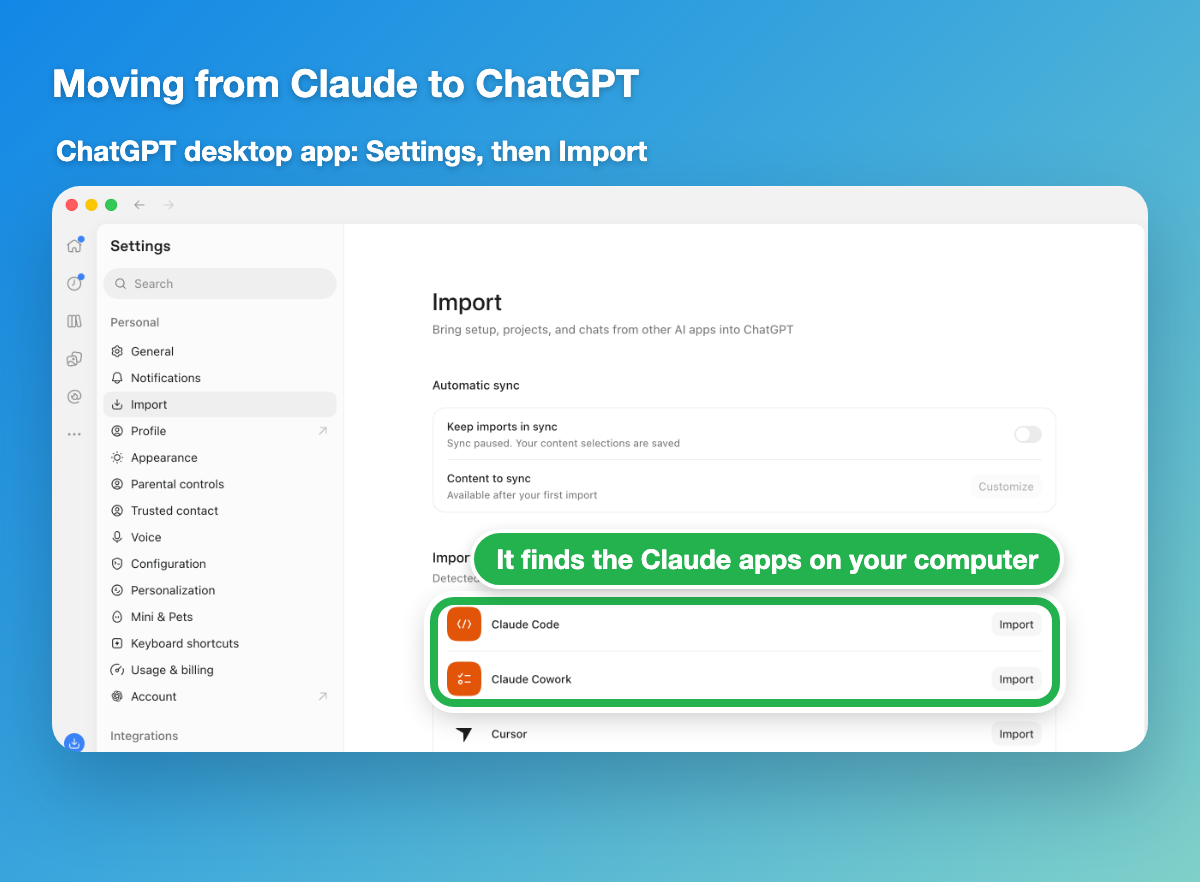
ChatGPT's desktop app has its own Import page for this. Go to Settings, then Import, and it'll find the Claude apps on your computer and bring across your setup, projects and chats. I haven't needed this one myself yet, so I can't tell you how well it works!
Only use Claude in your browser or on your phone? Then it's a quick copy and paste instead:
- In a new Claude chat, type: "Write out your memories of me verbatim, exactly as they appear in your memory."
- Read through what it gives back and delete anything that's out of date or that you'd rather not move.
- Open a new chat in ChatGPT, paste it in and say "Remember all of this about me!"
- Check it's saved by going to Settings, then Personalisation, then Memory.
One rule for all of this: don't tell it anything you wouldn't want saved. No passwords or bank details, and leave out anything personal you'd rather keep to yourself.
Your job this week
Pick the level that suits you.
Level 1: run the interview prompt and paste what it writes into your instructions. Five minutes, tops.
Level 2: ask "What do you remember about me?" and correct one thing it's got wrong.
Level 3: moving between ChatGPT and Claude? Bring your memory across with the import steps above.
Next week
Now AI knows who you are, I'll show you how to get it writing like you, so nobody can tell you used AI. All the prompts are included!
Quick favour before you go
I want to pitch these emails at the right difficulty level for you, and one tap below in the poll tells me if I've got it right or not.
| How was this week's email for you? |
|
|
|
|
Cheers,
Mike