Get the most out of AI. Every Sunday I share one of the AI setups I use, explained simply with easy-to-follow tutorials. Free.
Share
The starting point: let's get you set up properly 💪
Published about 1 month ago • 5 min read
THE GROWTH TOOLKIT
Hey Reader,
Yay!!! Welcome to the first ever issue of The Growth Toolkit 👋🙌 Thank you for subscribing. I'm sure you'll find tonnes of value here, and I'm not going to hold anything back!
Before I start sharing how I use AI day to day, I want to get you set up properly, so you can get the most out of it.
Some of you have never opened ChatGPT. Fine! Some of you use it on your phone every single day, and some of you are writing code and using agentic AI regularly. All good. Wherever you are in your journey, there'll be something in this for you.
My promise to you: there'll be no AI slop here. I use AI to help me research and fact-check, but every email is me, and I'll never send something I wouldn't want to read myself. I genuinely enjoy the writing.
If I jump straight into "here's how I work", half of you will probably read a little bit of it and archive it. I don't want that. I want you getting the most out of this stuff, to make your life easier.
So this first week is all about your setup. It's the part that makes everything else, and all my future emails, work!
Why the app you use is important
Most people use AI by typing into the ChatGPT mobile app or website. It's fast and reactive, so it's great for questions. BUT.. it's like having the smartest person you know stuck in a room with no hands. It can tell you what to do, but it can't do it itself.
The desktop "super apps" change that with agentic AI. Claude's desktop app and ChatGPT's desktop app (with Codex) wrap the same AI model (an LLM, or Large Language Model) in a harness, which is just a set of tools it's allowed to use. Think of the model as the engine of a car, and the harness as the body, with the tools being the wheels, lights, brakes and so on.
Now, please don't be put off by the fact these are called Claude "Code" and "Codex". For the non-developers here, we won't be writing a single line of code, or getting AI to write us any code either.
Theseharnesses let the AI act like an agent, which means we can allow it to:
read and create files on your computer
use your browser: click, type, fill in forms
crack on with tasks in the background while you do something more enjoyable 😍
It's the same brain. But now it has hands and tools.
What that looks like in reality
Say you've got a pair of trainers to sell on Facebook Marketplace. You need to take the photos, maybe crop them, write the description, work out the going rate, fill in the listing, pick the category, choose the condition... That could be 20 minutes of faff to make £30 😆
With a super app, you take the photos, attach them in the app (you can even do this from your phone while your laptop's on at home), type "List these Nike trainers on Facebook Marketplace, size 9, worn twice. Ask me any questions if you need to" and let AI do the rest. It checks what similar ones go for, writes the listing, opens Marketplace in your browser and fills it all in, then checks with you before it hits publish.
That's one tiny, but an incredibly useful example. Over the next few issues I'll show you how the same idea works for pretty much anything you do on a computer. And the models get noticeably better every few months. The people who are set up now are the ones who'll feel that first.
Pick your app
1. Claude (my pick)
Download the Claude desktop app from claude.com/download (Mac and Windows). Chat is free, but the bit we want, Claude Code, needs a paid plan. Pro is currently about £18 a month.
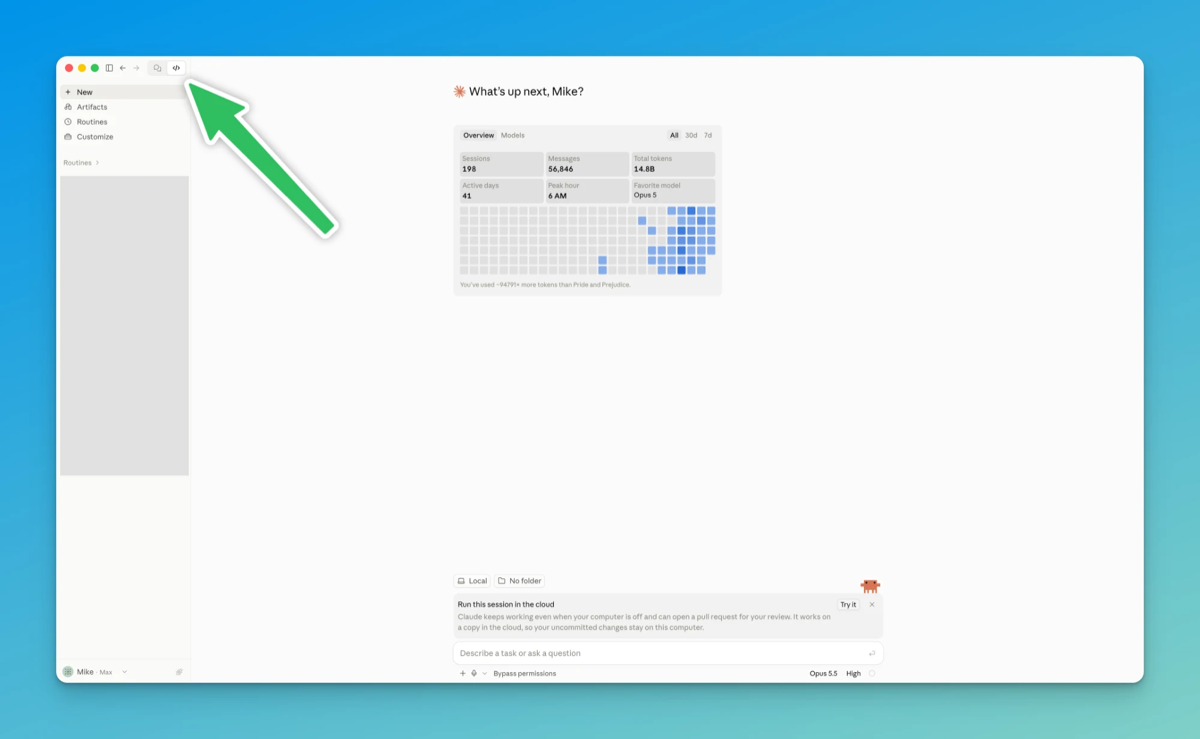
In Claude, click the code icon top left to open Claude Code
2. ChatGPT with Codex
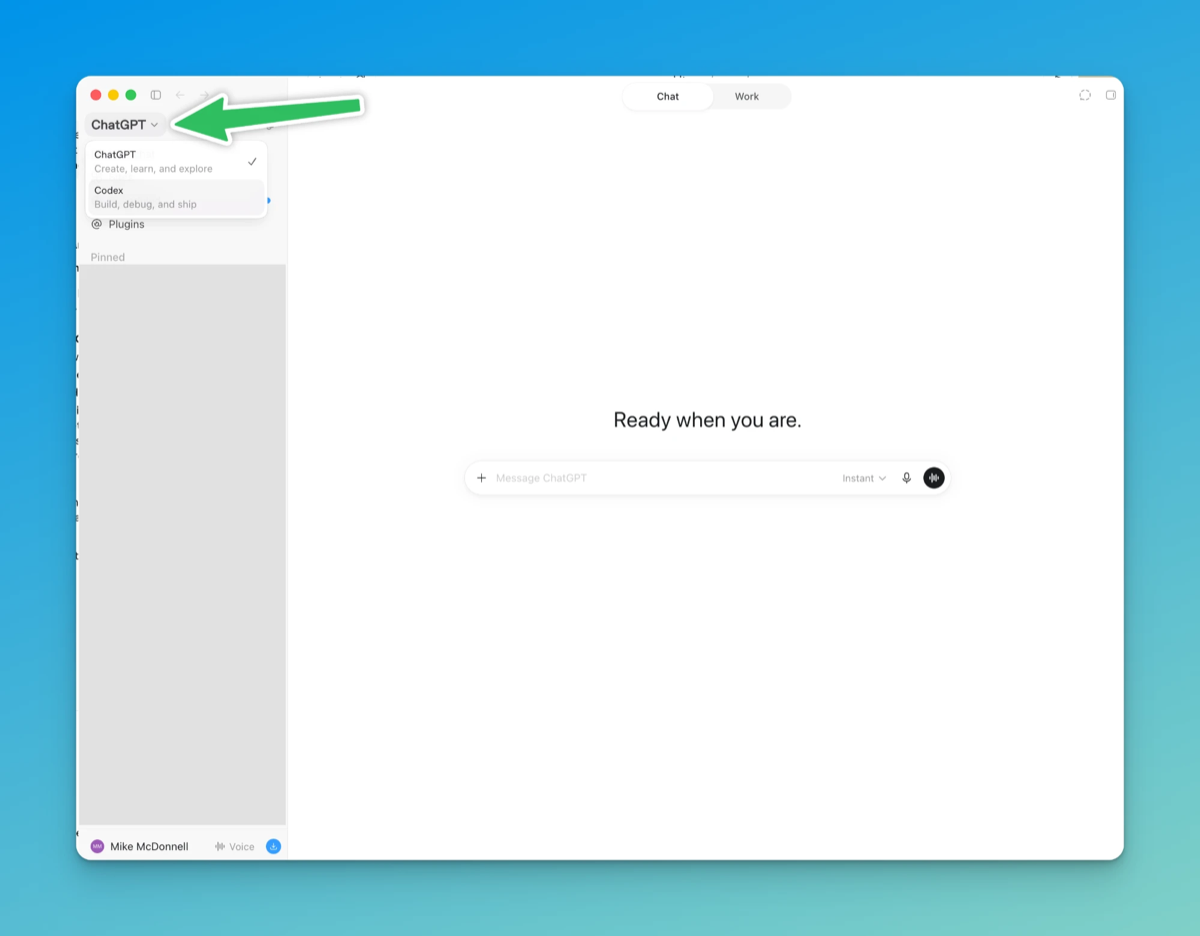
Download the ChatGPT desktop app (Mac and Windows). Top left, you can switch between ChatGPT and Codex. Codex comes with ChatGPT Plus, about £20 a month.
In ChatGPT, switch to Codex top left
Which one should you use? Honestly, I can barely split them. The models are that close now. I lean towards Claude because Anthropic's focus on safety sits a little better with me, and I find the app slightly easier to use. It's also what I use on my phone to run tasks on my laptop when I'm out. Codex has a brilliant voice mode though, like talking to Jarvis (from Iron Man) while it works in the background 👀
For what it's worth, I'm on Claude's top plan at about £180 a month because I use it all day, every day for work. You do not need that. The £18 plan is plenty to get started.
3. On a budget?
There's a free, open-source desktop app called OpenCode that does a similar job. You plug in a cheap open-source model like DeepSeek or GLM and pay pennies for what you use. I've used both, and six months ago they felt about 70% as good as Claude. They've come on a lot since, and I've figured out why they were falling short (more on that in a future series). It takes a bit more setting up, so I've put the full steps here: mikemcdonnell.co.uk/set-up-ai-desktop-apps
No laptop, or phone only? Stick with the ChatGPT or Claude app on your phone for now. You'll still get loads out of these emails.
Your task for this week (less than 15 minutes)
Download the Claude or ChatGPT desktop app and sign in.
Make a new folder on your desktop called AI.
Open Claude Code (the Code tab in Claude) or Codex (the switch top left in ChatGPT) and choose that folder.
Drop a couple of photos of something you'd sell into the folder, then paste this:
Look at the photos in this folder. Write me a Facebook Marketplace listing: a title, a fair price based on what similar items go for, and a short description that would make someone message me.
It'll ask your permission before it reads or changes anything. That's normal, and a good thing. Read what it's asking, then say yes or "Allow".
That's it. You've just had AI look at files on your computer and do a job for you, rather than just answer a question.
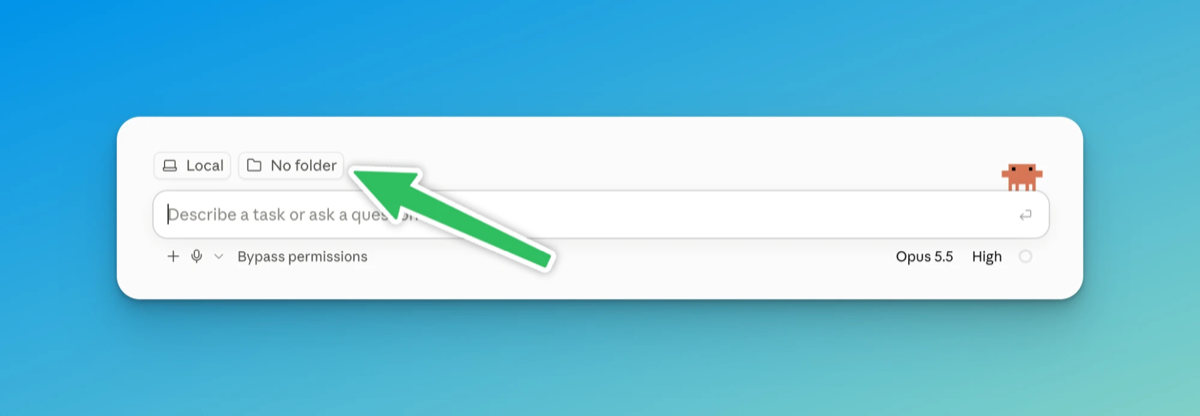
One rule while you're learning: keep it in that one folder. Don't point it at your whole computer (root folder) and let it do whatever it wants. The folder thing confused me more than anything when I started, so let's keep it simple for now.
In Claude Code, this is where you choose your AI folder
Next week
I'll send a video walkthrough: the setup, then getting AI to list something on Facebook Marketplace for me, start to finish.
Get stuck before then? Hit reply and tell me where. I read every reply, and it'll shape the video.
Cheers,
Mike
P.S. Reply with the route you're taking: Claude, ChatGPT, budget or phone only.
ISSUE 5 · SUNDAY 1 NOVEMBER I now do most of my work from my phone 3 ways to do it, for Claude and ChatGPT users Mike McDonnell The Growth Toolkit newsletter Hey Reader, Last week we got AI writing just like you, without it sounding like AI. This week, let's get it doing long-running tasks for you while you're nowhere near your desk! 📱😍 Of everything I've set up with AI, this has by far given me the most freedom in life. "Traditional" office work sitting at your desk can thankfully now be a...
THE GROWTH TOOLKIT Hey Reader, Last week we taught AI who you are. Now let's get it writing like you! You can spot AI writing a mile off!!! There'll be an em dash in almost every paragraph, or sentences like "it's not just a tool, it's a game-changer", or it'll talk about your industry being an "ever-evolving landscape" 😬 🤢If you're like me, the second you see it, you switch off and go elsewhere! On this subject, LinkedIn recently added a button, labelled "Seems like AI slop". Posts where...
THE GROWTH TOOLKIT Hey Reader, How many times have you typed "keep it short" or "I'm in the UK" into ChatGPT? Every new chat starts from scratch. It doesn't know what you do for work, who's in your family or that you can't stand a wall of bullet points, so you end up explaining yourself again.. and again. This week we fix that. It's all in the settings, there's nothing to install and it works on your phone too. When I started out I did this in ChatGPT, with a few lines about me in the custom...